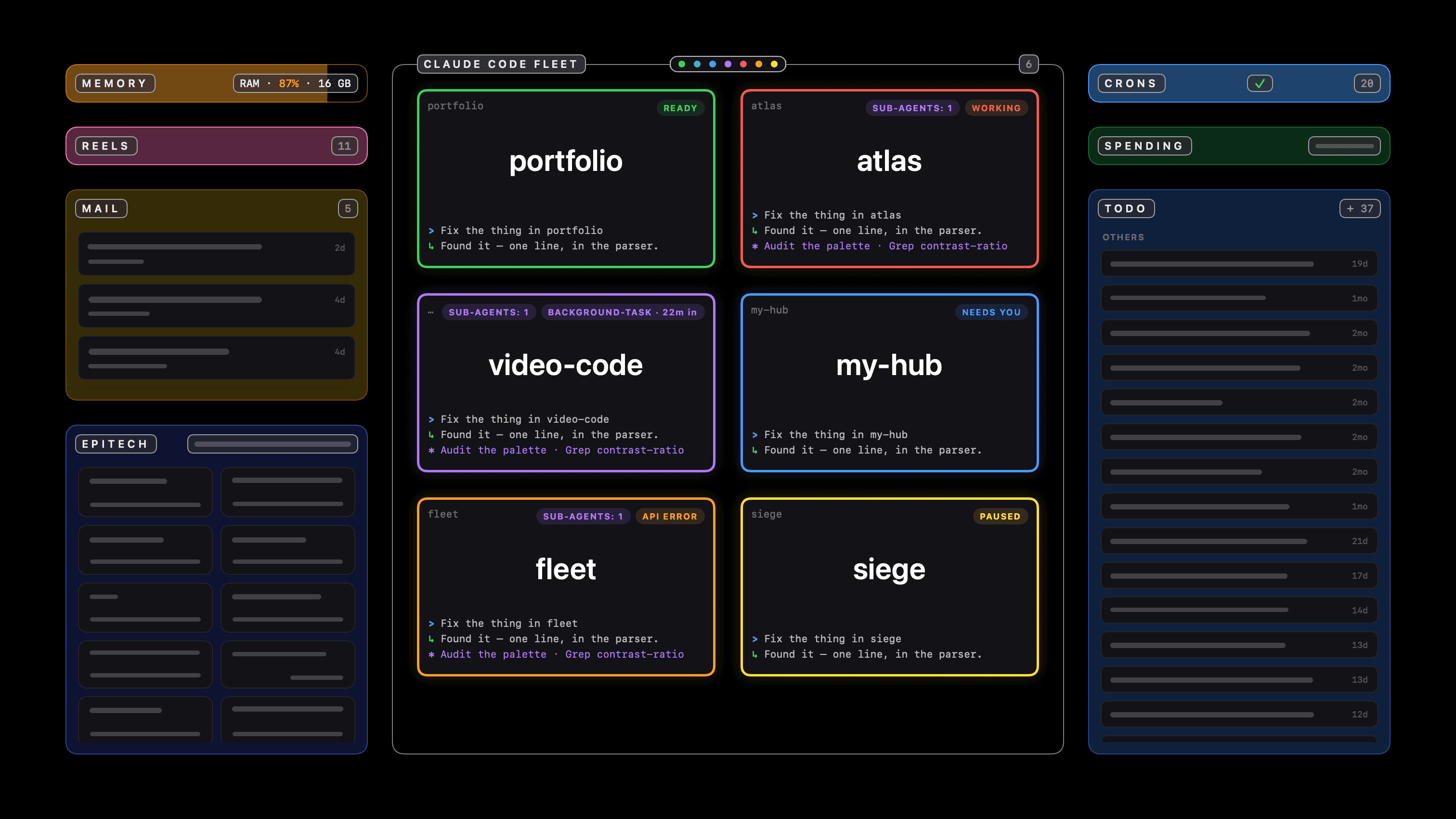
· Now
Stop typing for 45 seconds and a panel appears: one tile per running session, numbered, bordered green when the turn is done, red while a tool runs, blue when it is blocked on an answer, amber when the request failed. Click a tile — or press ⌘ and its number — and the exact terminal tab comes to the front with the cursor ready. Either side of the fleet sit the mail my phone has triaged and the todo list it holds, read from the same database the phone reads. Type into the field underneath and a model works out which project you meant. It runs all day for well under 1% of one core, because it never shells out and never screenshots.
- Three colours and a number. Green means the turn ended, red means a tool is running, blue means it is blocked on you, amber means the request failed. Every session wears the lowest free number, top left of its tile, and the grid is laid out by that number rather than by state — a grid that rearranges itself as turns finish is a grid you cannot point at. ⌘ and a digit go to that session, exactly as clicking its tile does.
- Claude Code reports its own state through hooks: one line of shell per event, writing a file the panel reads. So a tile's colour is usually something the tool said rather than something I inferred. The inference underneath stays anyway, because the hooks may not be installed, may have been installed after a session started, or may miss an event — and none of those should freeze a tile on a stale colour.
- The hard case is that “running a long command” and “showing you a permission prompt” look identical in a transcript: in both, a tool was called and no result came back. That tie breaks on behaviour rather than content. Burning CPU or writing to the transcript in the last 12 seconds means working; silence with a request outstanding means a prompt is on your screen.
- A finished turn and the gap between your prompt and the first token also look alike, so who spoke last breaks it. Cancelling with Esc appends a user message too, which is why that one marker is recognised and excluded, or a cancelled session would sit red forever.
- Two things Claude Code writes down nowhere: “API error · Retrying in 4s” while it retries, and its spinner while a long turn thinks. No transcript entry, no hook, no CPU — the same silence a question on your screen makes, which is why both used to read as “needs you”. The terminal is the only witness, so the panel asks the tab what it is showing, and only ever the last eight lines: the scrollback above may itself be a conversation about API errors, and a whole-screen search finds the words and declares a healthy session broken.
- Binding a process to its transcript takes four passes, because several sessions share a working directory. Read the id from argv, else claim the transcript created soonest after the process started, else the most recently modified one, and finally scan every recent transcript for one whose recorded directory matches.
- Either side of the fleet, the mail my phone has triaged and the todos it holds, out of the same Firestore. No Firebase SDK: anonymous sign-in and a few GETs over the REST API. The SDK opens a gRPC channel and keeps a local cache, which is the wrong shape entirely for an app that wants two requests when a panel opens and nothing at all the rest of the time.
- The todo column is writable, and building it turned up a gap in the data: nothing had ever stamped a todo with the date it was finished, so “done more than a fortnight ago” was not a question the collection could answer. The panel stamps it now, and files whatever is past that fortnight into a fourth pile — which the phone never shows, because its three tabs match on the exact three names.
- Typing into the panel is a model call, not a keyword list. “Fix the thing where the tiles swap” is code work with no code words in it, and “what should I cook tonight” is not, and no amount of matching on bug|deploy|repo tells those apart. A cheap model classifies the sentence, then either a session starts in the right project or the answer comes back on the panel.
- Two things it never does. It never shells out — no ps, no lsof, no pgrep, everything from libproc and sysctl directly, because forking a process on a timer is the most expensive thing a background agent can do and it is entirely avoidable. And it never screenshots: capturing terminal windows would mean ScreenCaptureKit, the Screen Recording permission and real GPU work every refresh, while reading a session's own JSONL transcript is cheaper, sharper at tile size and needs no permission at all.
- Clicking a tile raises the exact tab, not just the app: every session has a distinct TTY, and both Terminal.app and iTerm2 expose a tab's TTY to Scripting Bridge. Finding the host app means walking the parent chain through sysctl rather than proc_pidinfo, because login is setuid root and returns nothing to an unprivileged caller, which stopped the walk one step short every time.
- macOS 14 turned activation into something the system grants rather than something an app takes. A request with a user event behind it is honoured; the same call from a timer, on a machine nobody has touched for 45 seconds, is declined in silence — and since ordering a window to the front is not activation, the panel arrives without the keyboard. It notices, and takes the keyboard through the Accessibility API instead.
- It does no work at all when no session is open: one process-list check a minute, and it stops there. With sessions alive it refreshes every 5 seconds, but a transcript is only re-parsed if its tail actually moved. Timers carry 50% tolerance so macOS coalesces the wakeups, and every one is torn down on sleep. The backdrop is a flat scrim rather than a live material — continuous GPU work on a window whose whole purpose is saving power would be self-defeating.
- fleet --scan prints every session it can see, the transcript it bound, the state it derived and why. A background agent that guesses should be able to show its work.